
Artificial Intelligence
Multimodal AI Skills
Text-only AI interaction থেকে এগিয়ে Images, Screenshots, Documents, Files ও Mixed Inputs ব্যবহার করে task-relevant information বুঝতে, extract ও organize করতে এবং practical multimodal task সম্পন্ন করতে শিখুন।
Course Level: Text-Based AI User → Multimodal AI User
AI-এর সঙ্গে কাজ সবসময় শুধু text prompt-এর মধ্যে সীমাবদ্ধ নয়। কোনো Image দেখে information বুঝতে হতে পারে, Screenshot থেকে screen-এর visible content নিয়ে সাহায্য নিতে হতে পারে, একটি Document বা File-এর content নিয়ে কাজ করতে হতে পারে অথবা একই task-এ একাধিক ধরনের input একসঙ্গে ব্যবহার করতে হতে পারে।
Multimodal AI Skills Course-এ Images, Screenshots, Documents, Files এবং Mixed Inputs-কে AI-এর input ও context হিসেবে ব্যবহার করতে শিখবেন। এরপর task অনুযায়ী কোন input প্রয়োজন তা নির্বাচন, relevant inputs combine, relationship explain এবং clear instruction দিয়ে একটি complete multimodal AI workflow পরিচালনা করবেন।
এই Course কার জন্য
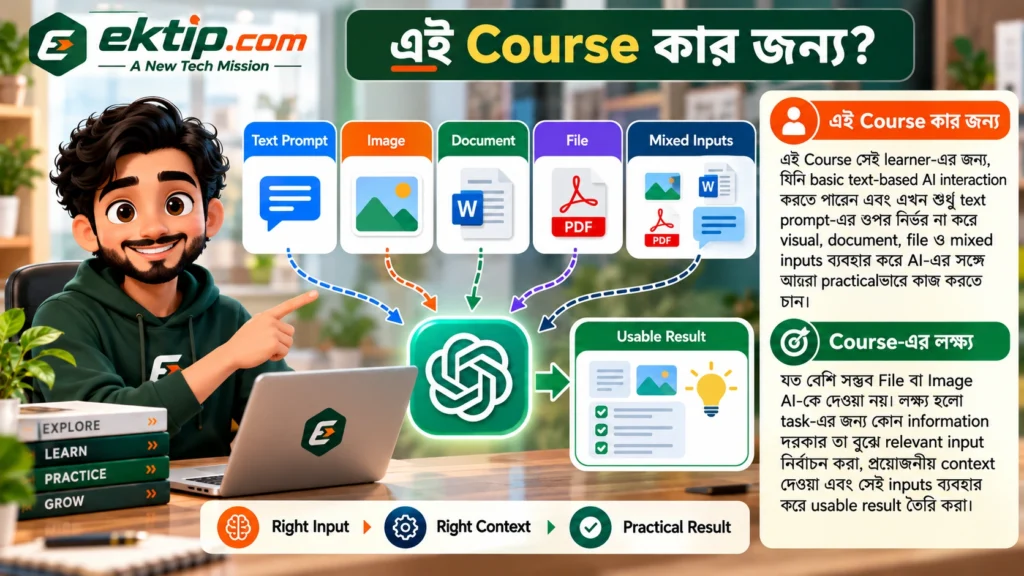
এই Course সেই learner-এর জন্য, যিনি basic text-based AI interaction করতে পারেন এবং এখন শুধু text prompt-এর ওপর নির্ভর না করে visual, document, file ও mixed inputs ব্যবহার করে AI-এর সঙ্গে আরও practicalভাবে কাজ করতে চান।
Course-এর লক্ষ্য যত বেশি সম্ভব File বা Image AI-কে দেওয়া নয়। লক্ষ্য হলো task-এর জন্য কোন information দরকার তা বুঝে relevant input নির্বাচন করা, প্রয়োজনীয় context দেওয়া এবং সেই inputs ব্যবহার করে usable result তৈরি করা।
এই Course শুরু করার আগে
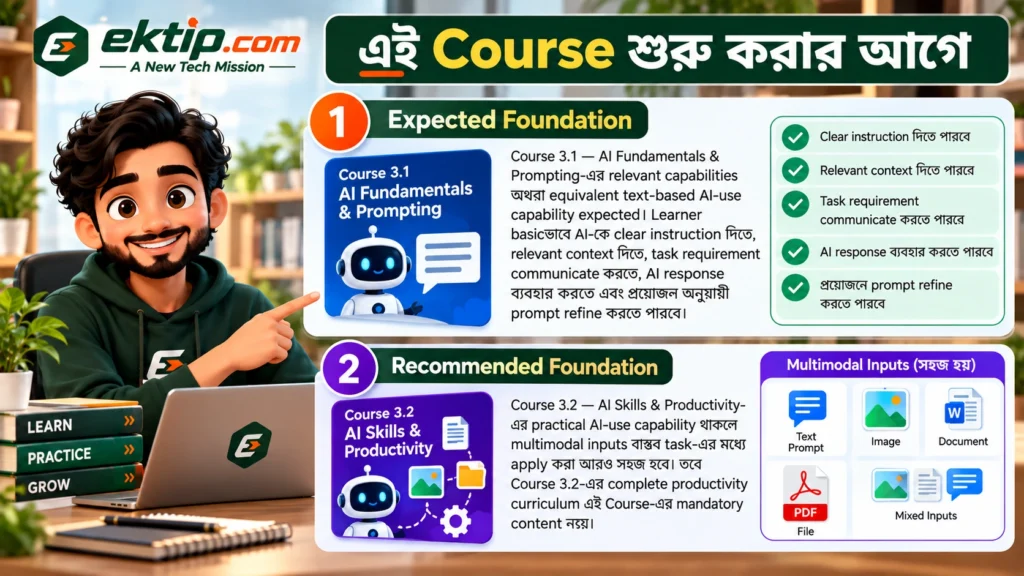
Expected Foundation
Course 3.1 — AI Fundamentals & Prompting-এর relevant capabilities অথবা equivalent text-based AI-use capability expected। Learner basicভাবে AI-কে clear instruction দিতে, relevant context দিতে, task requirement communicate করতে, AI response ব্যবহার করতে এবং প্রয়োজন অনুযায়ী prompt refine করতে পারবে।
Recommended Foundation
Course 3.2 — AI Skills & Productivity-এর practical AI-use capability থাকলে multimodal inputs বাস্তব task-এর মধ্যে apply করা আরও সহজ হবে। তবে Course 3.2-এর complete productivity curriculum এই Course-এর mandatory content নয়।
কেন এই Course শেখা দরকার
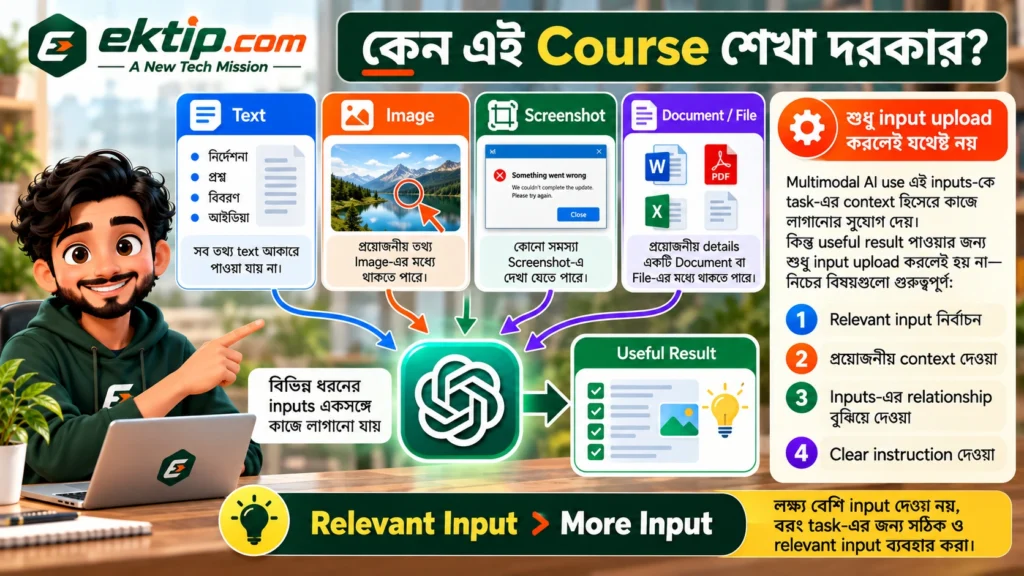
বাস্তব কাজের প্রয়োজনীয় information সবসময় text আকারে থাকে না। কোনো information Image-এর মধ্যে থাকতে পারে, কোনো সমস্যা Screenshot-এ দেখা যেতে পারে, প্রয়োজনীয় details একটি Document বা File-এর মধ্যে থাকতে পারে অথবা একটি task বুঝতে একাধিক input-এর information একসঙ্গে connect করার প্রয়োজন হতে পারে।
Multimodal AI use এই inputs-কে task-এর context হিসেবে কাজে লাগানোর সুযোগ দেয়। কিন্তু useful result পাওয়ার জন্য শুধু input upload করলেই হয় না—relevant input নির্বাচন, প্রয়োজনীয় context, inputs-এর relationship এবং clear instruction গুরুত্বপূর্ণ।
Relevant Input > More Input
Course শেষে কী করতে পারবেন
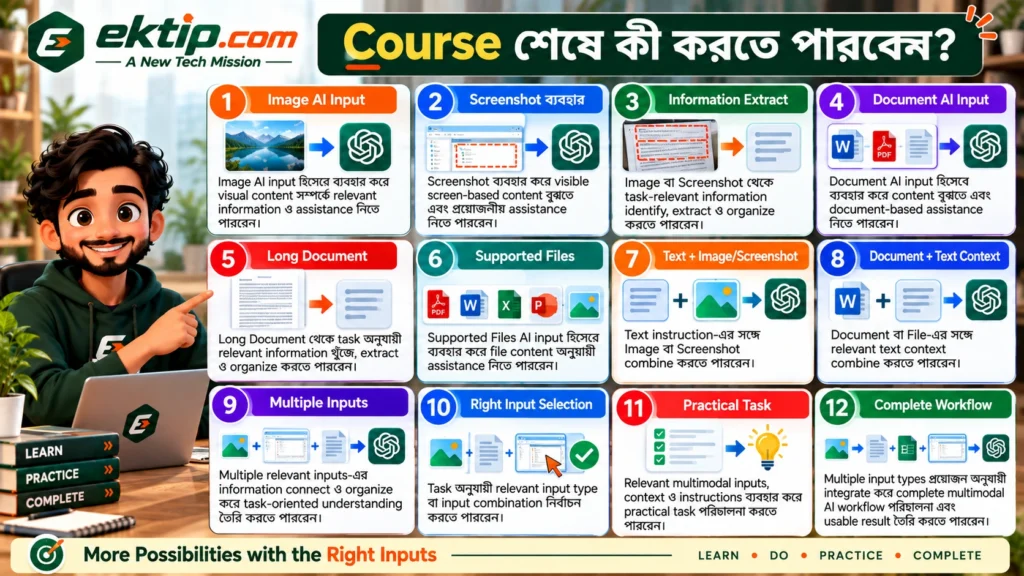
- Image AI input হিসেবে ব্যবহার করে visual content সম্পর্কে relevant information ও assistance নিতে পারবেন।
- Screenshot ব্যবহার করে visible screen-based content বুঝতে এবং প্রয়োজনীয় assistance নিতে পারবেন।
- Image বা Screenshot থেকে task-relevant information identify, extract ও organize করতে পারবেন।
- Document AI input হিসেবে ব্যবহার করে content বুঝতে এবং document-based assistance নিতে পারবেন।
- Long Document থেকে task অনুযায়ী relevant information খুঁজে, extract ও organize করতে পারবেন।
- Supported Files AI input হিসেবে ব্যবহার করে file content অনুযায়ী assistance নিতে পারবেন।
- Text instruction-এর সঙ্গে Image বা Screenshot combine করতে পারবেন।
- Document বা File-এর সঙ্গে relevant text context combine করতে পারবেন।
- Multiple relevant inputs-এর information connect ও organize করে task-oriented understanding তৈরি করতে পারবেন।
- Task অনুযায়ী relevant input type বা input combination নির্বাচন করতে পারবেন।
- Relevant multimodal inputs, context ও instructions ব্যবহার করে practical task পরিচালনা করতে পারবেন।
- Multiple input types প্রয়োজন অনুযায়ী integrate করে complete multimodal AI workflow পরিচালনা এবং usable result তৈরি করতে পারবেন।
Course কীভাবে সাজানো হয়েছে
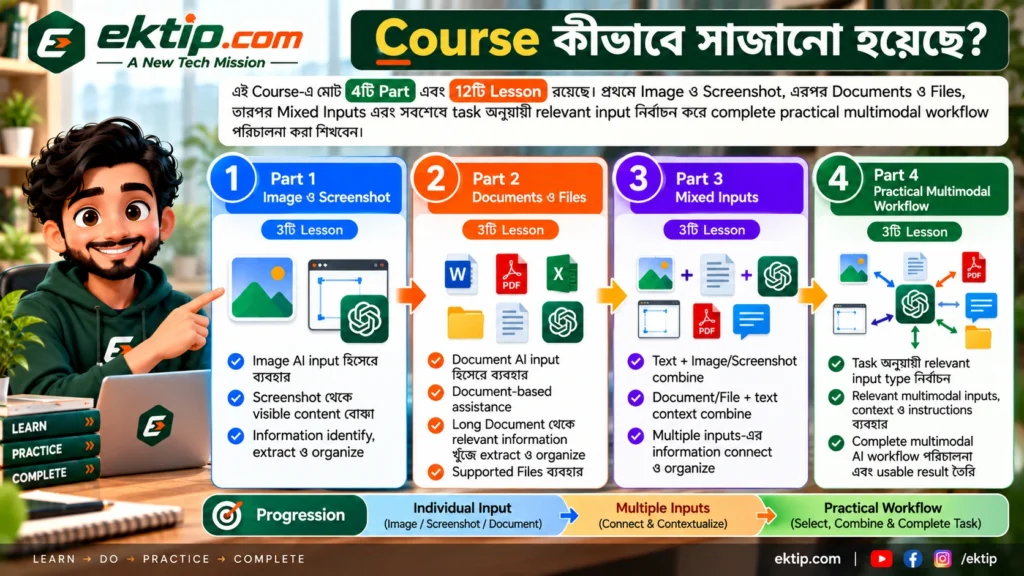
এই Course-এ মোট 4টি Part এবং 12টি Lesson রয়েছে। প্রথমে Image ও Screenshot, এরপর Documents ও Files, তারপর Mixed Inputs এবং সবশেষে task অনুযায়ী relevant input নির্বাচন করে complete practical multimodal workflow পরিচালনা করা শিখবেন।
Progression এমনভাবে সাজানো হয়েছে যাতে individual input ব্যবহার থেকে শুরু করে ধীরে ধীরে multiple inputs connect ও contextualize করতে পারেন এবং শেষ পর্যন্ত task-এর জন্য প্রয়োজনীয় modalities নিজে নির্বাচন ও combine করতে পারেন।
Complete Course Roadmap
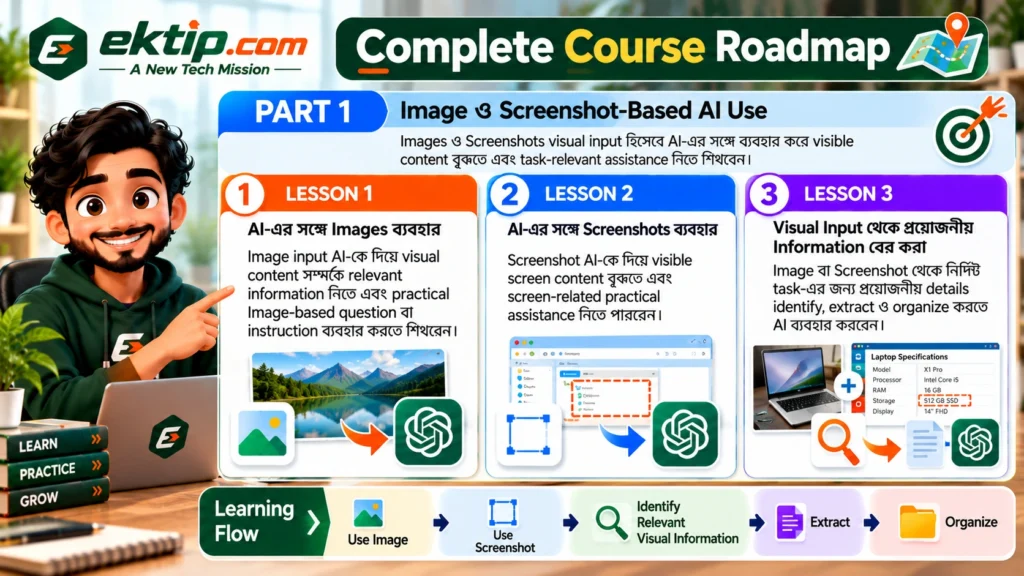
PART 1 — Image ও Screenshot-Based AI Use
Images ও Screenshots visual input হিসেবে AI-এর সঙ্গে ব্যবহার করে visible content বুঝতে এবং task-relevant assistance নিতে শিখবেন।
LESSON 1 — AI-এর সঙ্গে Images ব্যবহার
Image input AI-কে দিয়ে visual content সম্পর্কে relevant information নিতে এবং practical Image-based question বা instruction ব্যবহার করতে শিখবেন।
LESSON 2 — AI-এর সঙ্গে Screenshots ব্যবহার
Screenshot AI-কে দিয়ে visible screen content বুঝতে এবং screen-related practical assistance নিতে পারবেন।
LESSON 3 — Visual Input থেকে প্রয়োজনীয় Information বের করা
Image বা Screenshot থেকে নির্দিষ্ট task-এর জন্য প্রয়োজনীয় details identify, extract ও organize করতে AI ব্যবহার করবেন।
Use Image → Use Screenshot → Identify Relevant Visual Information → Extract → Organize
PART 2 — Documents ও Files-এর সঙ্গে AI
Documents ও Files AI input হিসেবে ব্যবহার করে content বুঝতে, task-relevant information বের করতে এবং file-based assistance নিতে শিখবেন।
LESSON 4 — AI-এর সঙ্গে Documents ব্যবহার
Document AI-কে দিয়ে content বুঝতে এবং relevant question বা instruction-এর মাধ্যমে document-based assistance নিতে পারবেন।
LESSON 5 — Long Document থেকে প্রয়োজনীয় Information বের করা
Long Document থেকে নির্দিষ্ট task বা question-এর জন্য relevant information locate, extract ও organize করতে AI ব্যবহার করবেন।
LESSON 6 — AI-এর সঙ্গে Files ব্যবহার
Supported File input AI-কে দিয়ে file content অনুযায়ী relevant question, instruction ও practical assistance ব্যবহার করতে শিখবেন।
Use Document → Work with Longer Content → Extract Relevant Information → Use Supported Files
PART 3 — Mixed Inputs ও Multimodal Interaction
একাধিক input type একই task-এর context হিসেবে combine করে richer multimodal interaction এবং connected understanding তৈরি করবেন।
LESSON 7 — Text ও Visual Input একসঙ্গে ব্যবহার
Text instruction-এর সঙ্গে Image বা Screenshot combine করে relevant context ও task-specific instruction দিয়ে AI assistance নিতে শিখবেন।
LESSON 8 — Document, File ও Context একসঙ্গে ব্যবহার
Document বা File-এর সঙ্গে task-related context combine করে input-এর relevant relationship AI-কে বুঝিয়ে specific assistance নিতে পারবেন।
LESSON 9 — Multiple Inputs থেকে Information Connect করা
দুই বা ততোধিক relevant input-এর information connect ও organize করে একটি task-এর জন্য usable understanding তৈরি করতে AI ব্যবহার করবেন।
Text + Visual → Document/File + Context → Multiple Inputs → Connect Information → Build Task-Oriented Understanding
PART 4 — Practical Multimodal AI Workflow
Task অনুযায়ী relevant input নির্বাচন এবং Images, Screenshots, Documents, Files ও Mixed Inputs প্রয়োজন অনুযায়ী combine করে practical multimodal task complete করবেন।
LESSON 10 — Task অনুযায়ী Input নির্বাচন
একটি task-এর জন্য Text, Image/Screenshot, Document/File অথবা Mixed Inputs-এর মধ্যে কোন input type বা combination প্রয়োজন তা নির্ধারণ করতে শিখবেন।
LESSON 11 — Multimodal Task পরিচালনা
Relevant inputs select করে প্রয়োজনীয় context ও clear instruction-এর সঙ্গে AI ব্যবহার করে একটি practical multimodal task এগিয়ে নিতে পারবেন।
LESSON 12 — Complete Multimodal AI Workflow
Images, Screenshots, Documents, Files ও Mixed Inputs প্রয়োজন অনুযায়ী integrate করে complete multimodal AI workflow পরিচালনা এবং usable result তৈরি করবেন।
Understand Task → Select Input → Combine Inputs → Add Context → Instruct → Use Response → Review Against Task → Produce Usable Result
একটি complete multimodal AI workflow

Course-এর শেষ লক্ষ্য হলো আলাদা আলাদা input upload করা নয়। একটি practical task বুঝে প্রয়োজনীয় information কোথায় আছে তা নির্ধারণ করা, সেই অনুযায়ী relevant inputs নির্বাচন এবং AI-কে inputs-এর context ও relationship বুঝিয়ে task এগিয়ে নেওয়া।
Understand Task → Determine Required Information → Select Relevant Input Type(s) → Provide Image / Screenshot / Document / File → Add Relevant Text Context → Explain Input Relationships → Give Clear Instruction → Use AI Response → Review Against Task Need → Continue / Adjust as Needed → Produce Usable Multimodal Result
Multimodal AI User বলতে কী বোঝায়
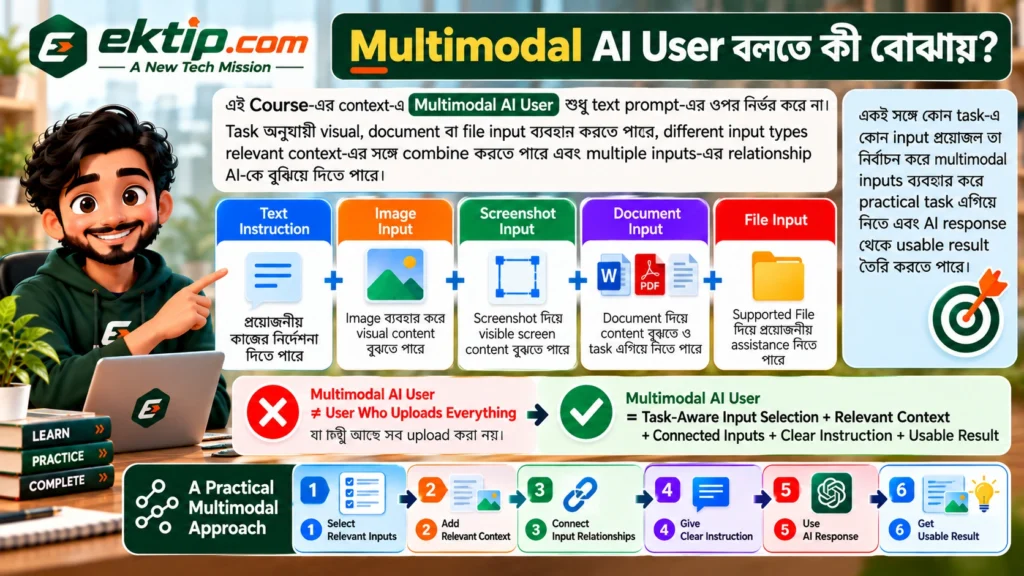
এই Course-এর context-এ Multimodal AI User শুধু text prompt-এর ওপর নির্ভর করে না। Task অনুযায়ী visual, document বা file input ব্যবহার করতে পারে, different input types relevant context-এর সঙ্গে combine করতে পারে এবং multiple inputs-এর relationship AI-কে বুঝিয়ে দিতে পারে।
একই সঙ্গে কোন task-এ কোন input প্রয়োজন তা নির্বাচন করে multimodal inputs ব্যবহার করে practical task এগিয়ে নিতে এবং AI response থেকে usable result তৈরি করতে পারে।
Multimodal AI User ≠ User Who Uploads Everything
Multimodal AI User = Task-Aware Input Selection + Relevant Context + Connected Inputs + Clear Instruction + Usable Result
এই Course-এর সীমা
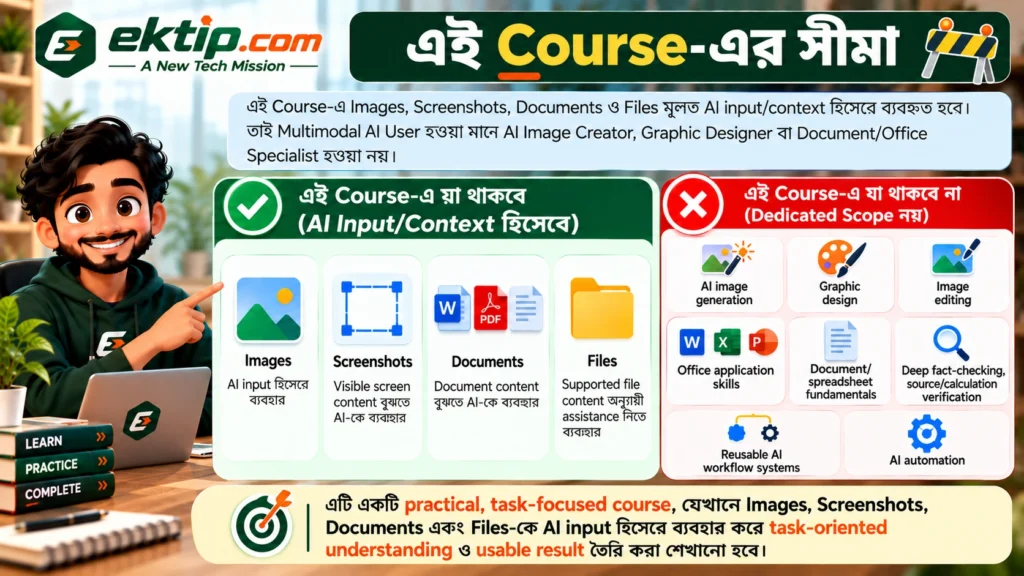
এই Course-এ Images, Screenshots, Documents ও Files মূলত AI input/context হিসেবে ব্যবহৃত হবে। তাই Multimodal AI User হওয়া মানে AI Image Creator, Graphic Designer বা Document/Office Specialist হওয়া নয়।
AI image generation, graphic design, image editing, Office application skills, document বা spreadsheet fundamentals, deep fact-checking, source/calculation verification, reusable AI workflow systems এবং AI automation এই Course-এর dedicated scope নয়।
অন্যান্য AI Courses-এর সঙ্গে সম্পর্ক
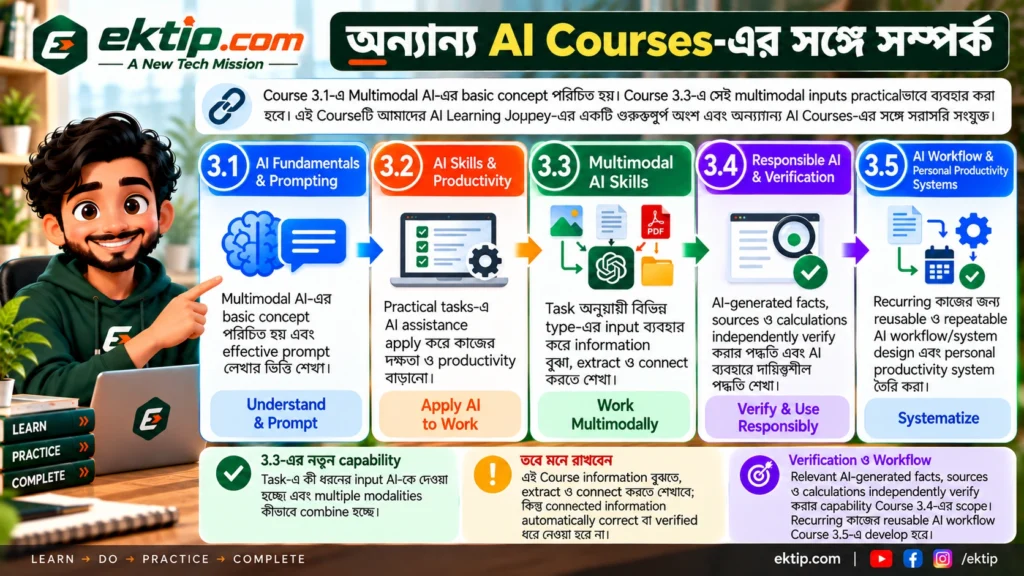
Course 3.1 — AI Fundamentals & Prompting-এ Multimodal AI-এর basic concept পরিচিত হয়। Course 3.3-এ সেই multimodal inputs practicalভাবে ব্যবহার করা হবে।
Course 3.1 — AI Fundamentals & Prompting: Understand & Prompt
Course 3.2 — AI Skills & Productivity: Apply AI to Work
Course 3.3 — Multimodal AI Skills: Work Multimodally
Course 3.4 — Responsible AI & Verification: Verify & Use Responsibly
Course 3.5 — AI Workflow & Personal Productivity Systems: Systematize
Course 3.2 practical tasks-এ AI assistance apply করে। Course 3.3-এর নতুন capability হলো সেই task-এ কী ধরনের input AI-কে দেওয়া হচ্ছে এবং multiple modalities কীভাবে combine হচ্ছে।
এই Course information বুঝতে, extract ও connect করতে শেখাবে; কিন্তু connected information automatically correct বা verified ধরে নেওয়া হবে না। Relevant AI-generated facts, sources ও calculations independently verify করার capability Course 3.4-এর scope। Recurring কাজের reusable ও repeatable AI workflow/system Course 3.5-এ develop হবে।
Courseটি কীভাবে অনুসরণ করবেন
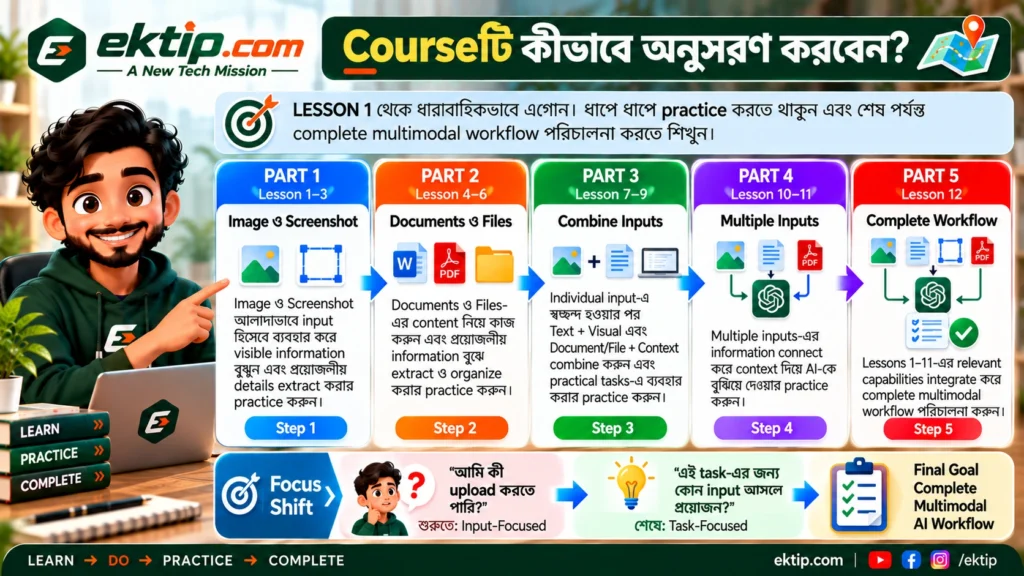
LESSON 1 থেকে ধারাবাহিকভাবে এগোন। প্রথমে Image ও Screenshot আলাদাভাবে input হিসেবে ব্যবহার করে visible information বুঝুন এবং প্রয়োজনীয় details extract করার practice করুন।
এরপর Documents ও Files-এর content নিয়ে কাজ করুন। Individual input ব্যবহারে স্বচ্ছন্দ হওয়ার পর Text + Visual এবং Document/File + Context combine করুন। তারপর multiple inputs-এর information connect করার practice করুন।
শেষ Part-এ focus বদলে যাবে “আমি কী upload করতে পারি?” থেকে “এই task-এর জন্য কোন input আসলে প্রয়োজন?”-এ। LESSON 12-এ Lessons 1–11-এর relevant capabilities integrate করে complete multimodal workflow পরিচালনা করবেন।
শুরু করুন
LESSON 1 থেকে শুরু করুন
AI-এর সঙ্গে Images ব্যবহার করে text-only interaction থেকে practical multimodal AI use-এর দিকে এগিয়ে যান।